Smart Buildings · Cooper Lighting · 2026

A building that answers in plain English

A big office or hospital can have thousands of lights, sensors and switches all wired into one system. When something went wrong, that system answered with a code only a specialist could read, and left you to work out the rest. I designed the AI that answers in plain English instead: what broke, why, what to do about it, and which light is likely to fail next month.

Read the full case study See the three big ideas
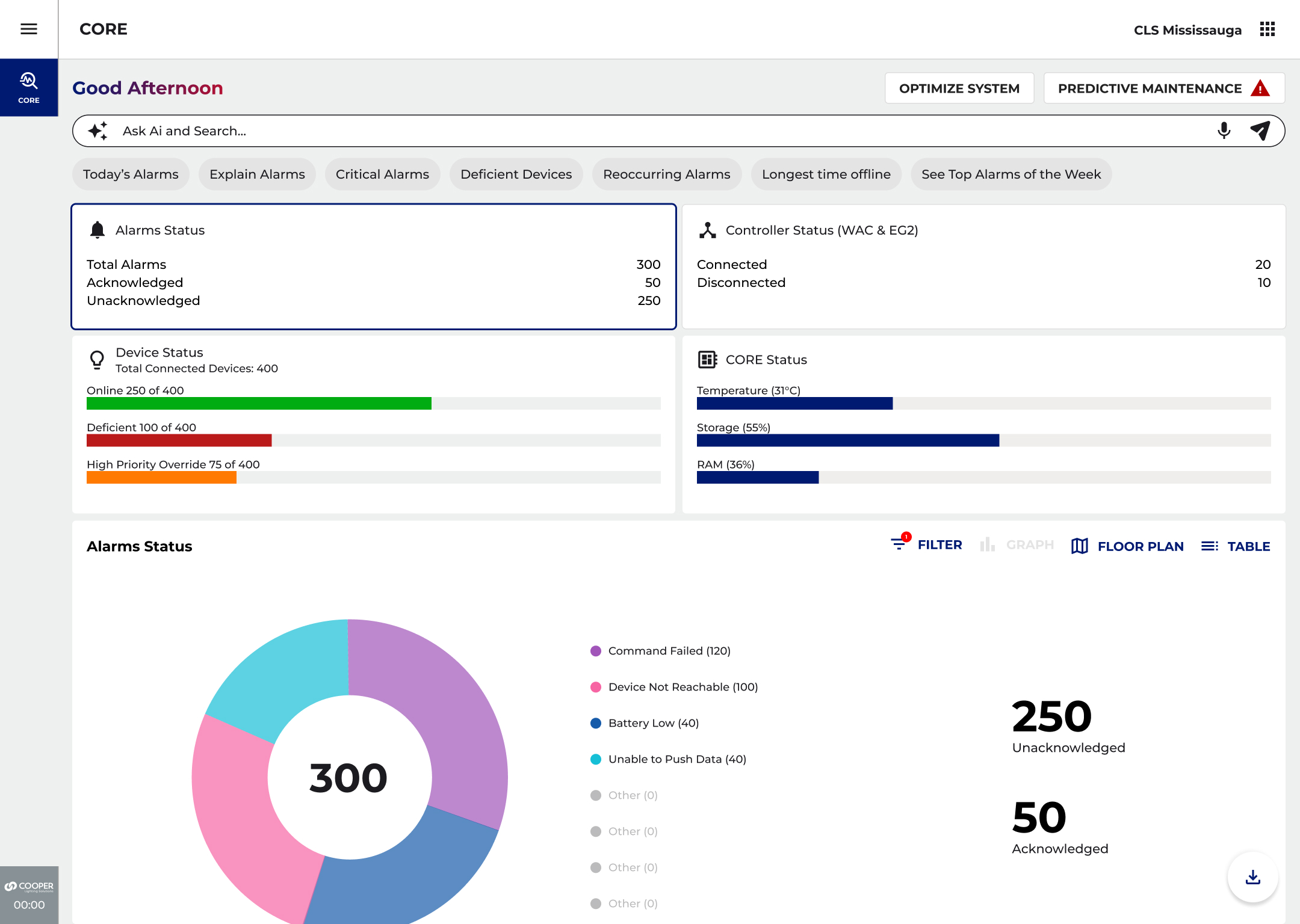
core.cooperlighting.com · ask ai & search
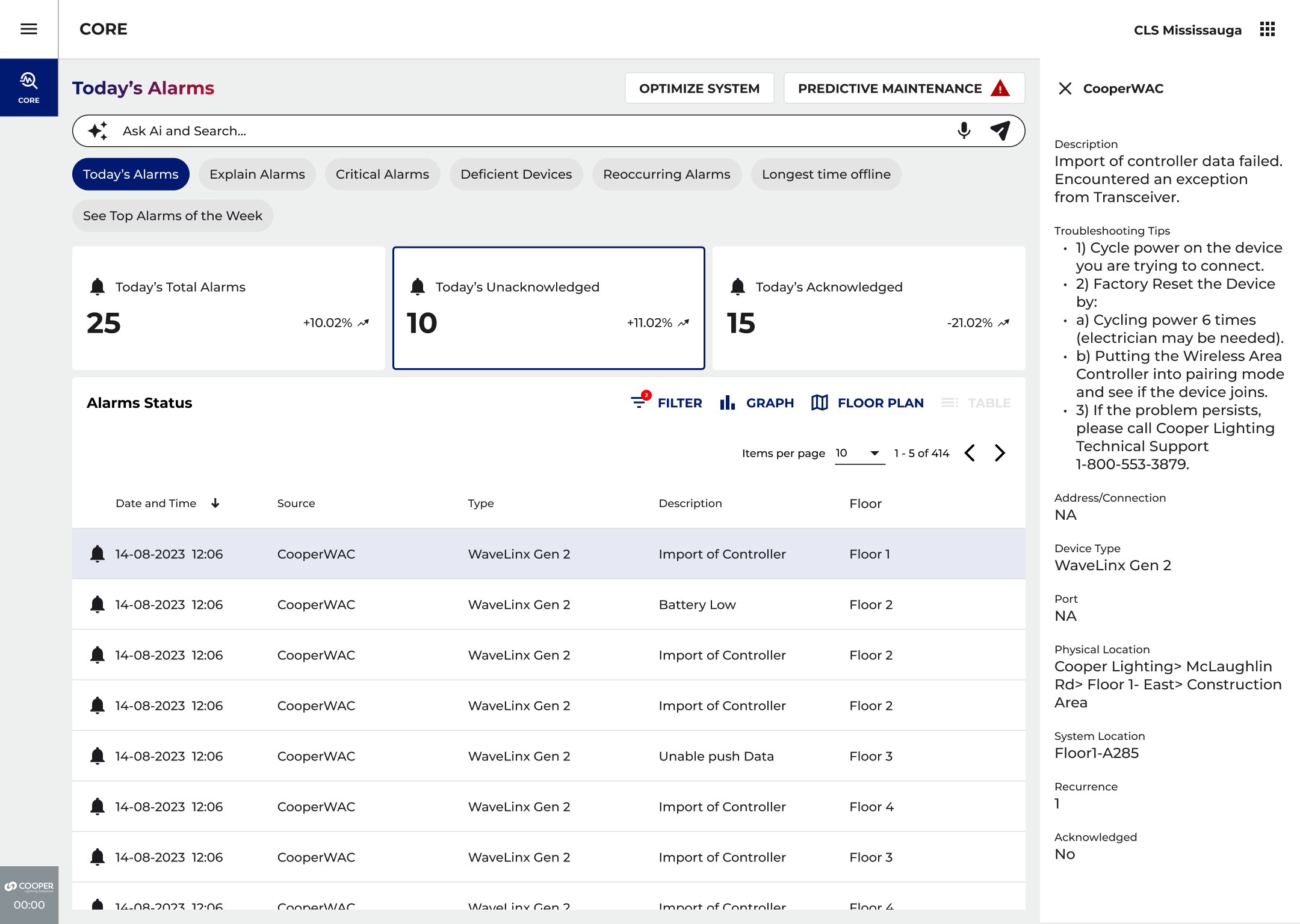
The main CORE screen: a search bar for asking questions, and a summary of everything that needs attention across the building's lights and sensors
The main screen: one search bar, a few one-tap questions, and everything needing attention today
The Job

A wall of error codes, turned into a conversation

CORE is the software that watches over every light, sensor and switch in a company's buildings. On a big site that is thousands of things, and every one of them can report a problem. The trouble was the reporting: a stream of codes and numbers that only a handful of experts could read. And nobody found out a light was in trouble until the day it stopped working.

My job was to work out where AI actually belonged in a product people already used every day. Not a chatbot bolted onto the corner of the screen, but help sitting right where the work happens. It came down to three ideas: you can just ask it a question, it explains every problem in words you understand, and it warns you before something breaks.

My role
Lead designer
What I did
Worked out where AI belongedDesigned the screens and the wording
Where it lives
CORE, in a web browser
The field
Lights and sensors connected to the internet
Who uses it
The building manager and the repair techThe salesperson choosing the lights
When
2026
The Problem

Messages only an expert could read

One large site can have hundreds of devices throwing hundreds of messages a day. Almost none of them meant anything to the person who had to go and fix them. That gave the AI an obvious job on day one.

01
Too many alerts
Up to 300 alerts a day on a site with 400 or more devices, in 14 different types. Hardly any of them readable without phoning an expert.
02
Three people, three questions
The building manager, the tech up a ladder, and the salesperson picking the lights all need the same facts, told a completely different way.
03
Always one step behind
Nobody touched a device until it had already gone dark. The system never gave anyone a heads-up that a failure was coming.
Idea one · Just ask

One box. Ask the building anything.

One search bar sits at the top of every screen, with one-tap buttons for the questions people ask every morning. The same answer comes back three ways: pinned on a floor plan, counted up building by building, or listed out plainly.
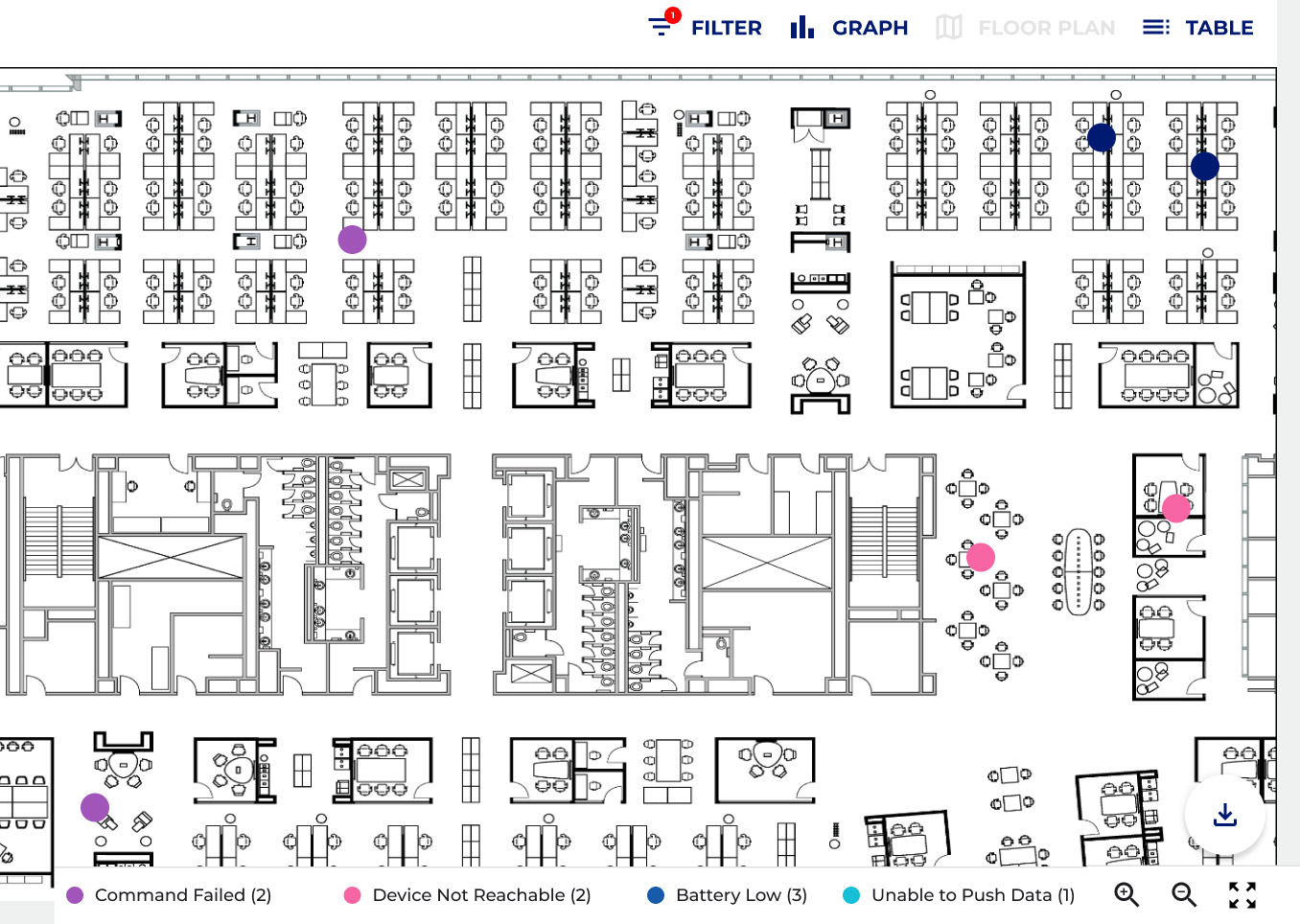
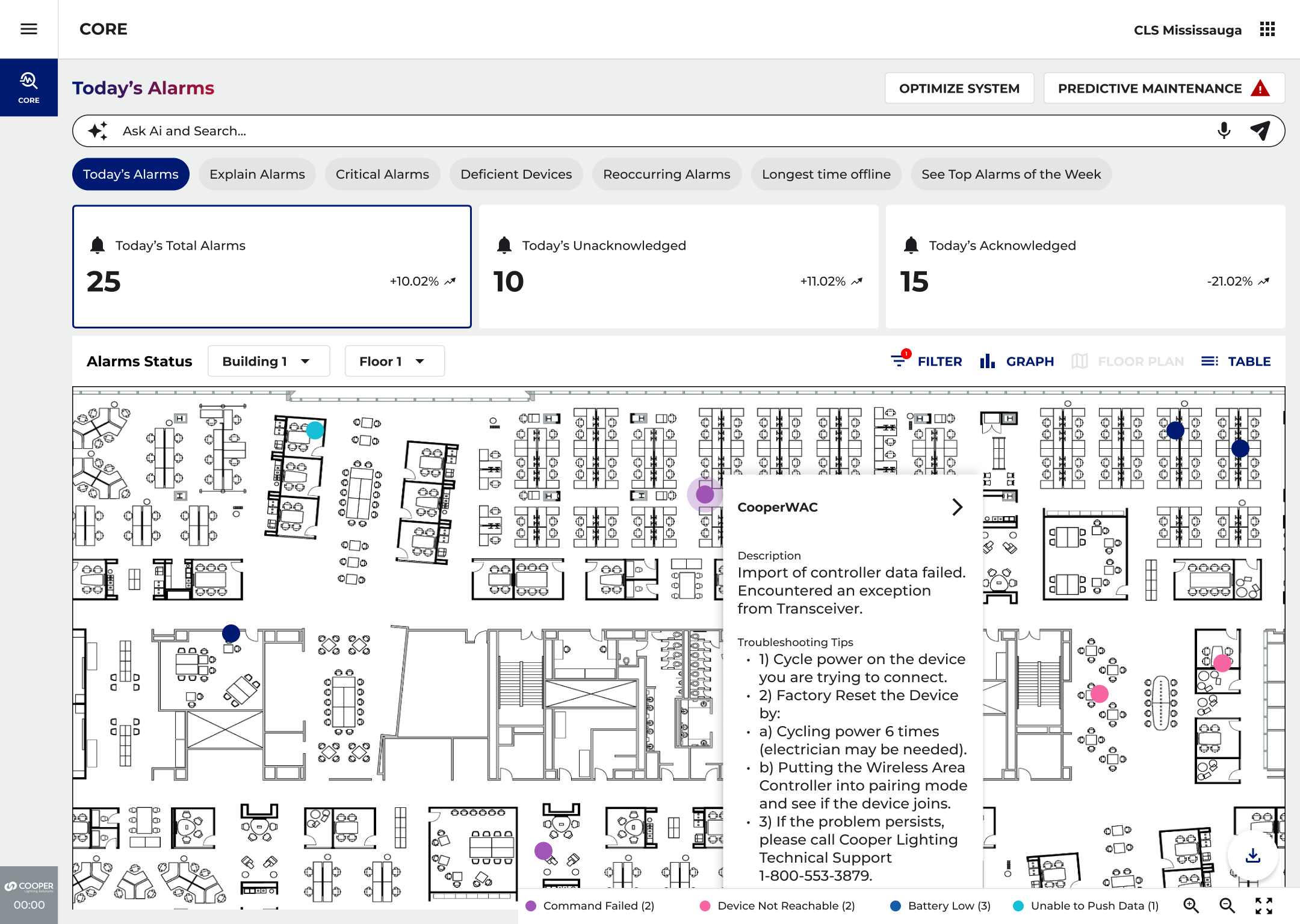
Today's problems shown as colored pins on a live floor plan, so you can see exactly where each one is
On the floor plan: every problem, pinned where it actually is
The same problems added up building by building and floor by floor, across every site
By building: which sites need you most
A sortable list of today's problems by time, device, type and floor
As a list: for working through a lot of them fast
How I Made It Useful

Explain it, then say what to do

AI only earns its keep if it helps the person standing in a dark hallway at 2am. So every answer had to do two things: explain what happened, and give one clear next step. No open-ended chatting. Every answer points at a real device, so you can check it.

01
Buttons, not a search language
One-tap buttons for the questions people already ask: what broke today, what is urgent, what is limping along, what has been dead the longest. Nobody has to learn how to word it.
02
Every code, put into English
Tap Explain and a baffling code becomes a sentence about what went wrong, plus a numbered list of what to do. The answer your best technician would give, now available to everyone.
03
Fix it before it dies
Every device shows its age, its software version, and roughly how long the AI thinks it has left. Anything within about two months of the end gets flagged, with a suggested fix one tap away.
04
Pick a goal, let it adjust
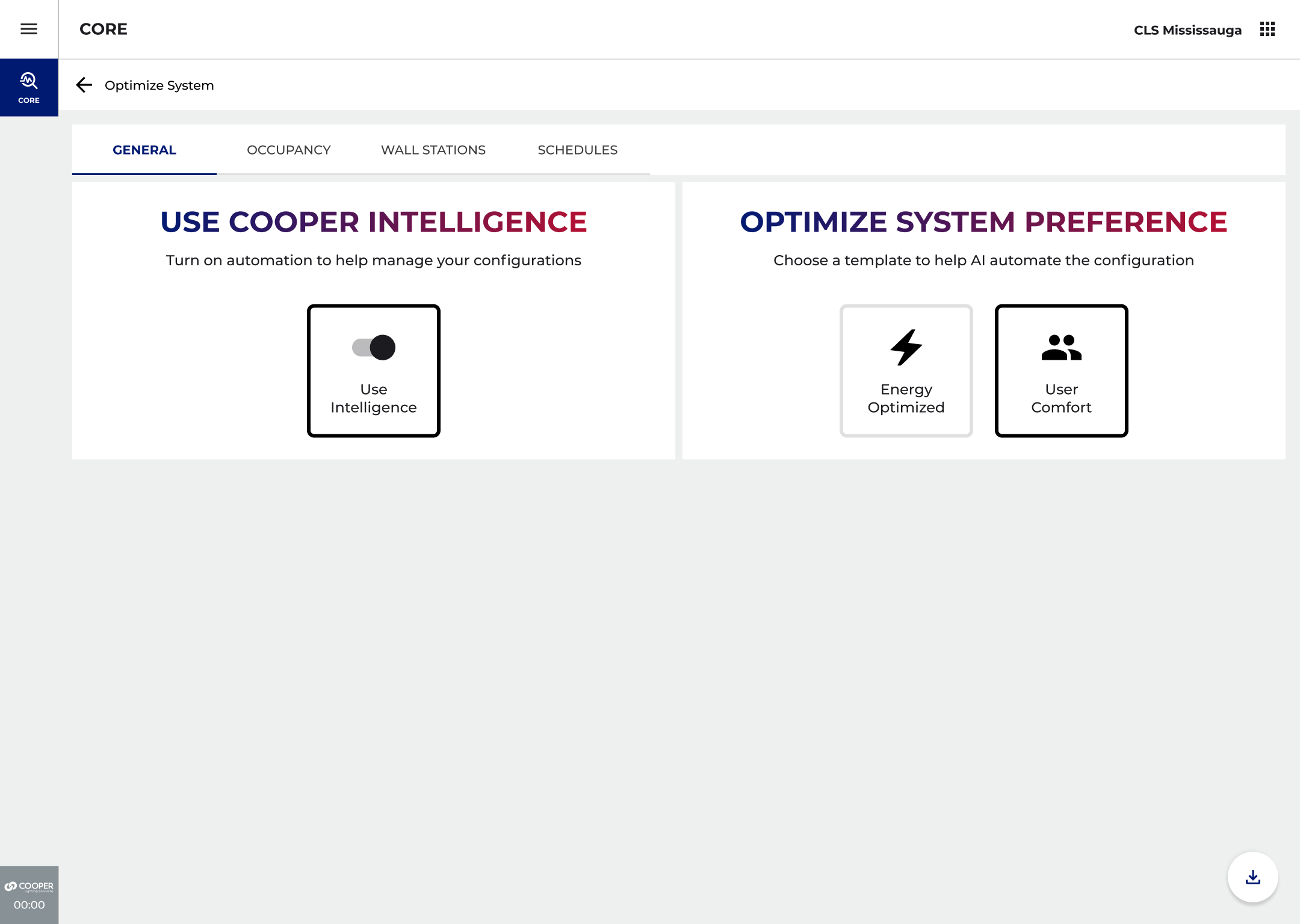
Choose one thing to aim for, save energy or keep people comfortable, and the system tunes the sensors, the dimming and the timers across the whole site. Then it keeps learning from how the building really gets used.
Ideas two and three · Explain, then warn

Every alert becomes a plan

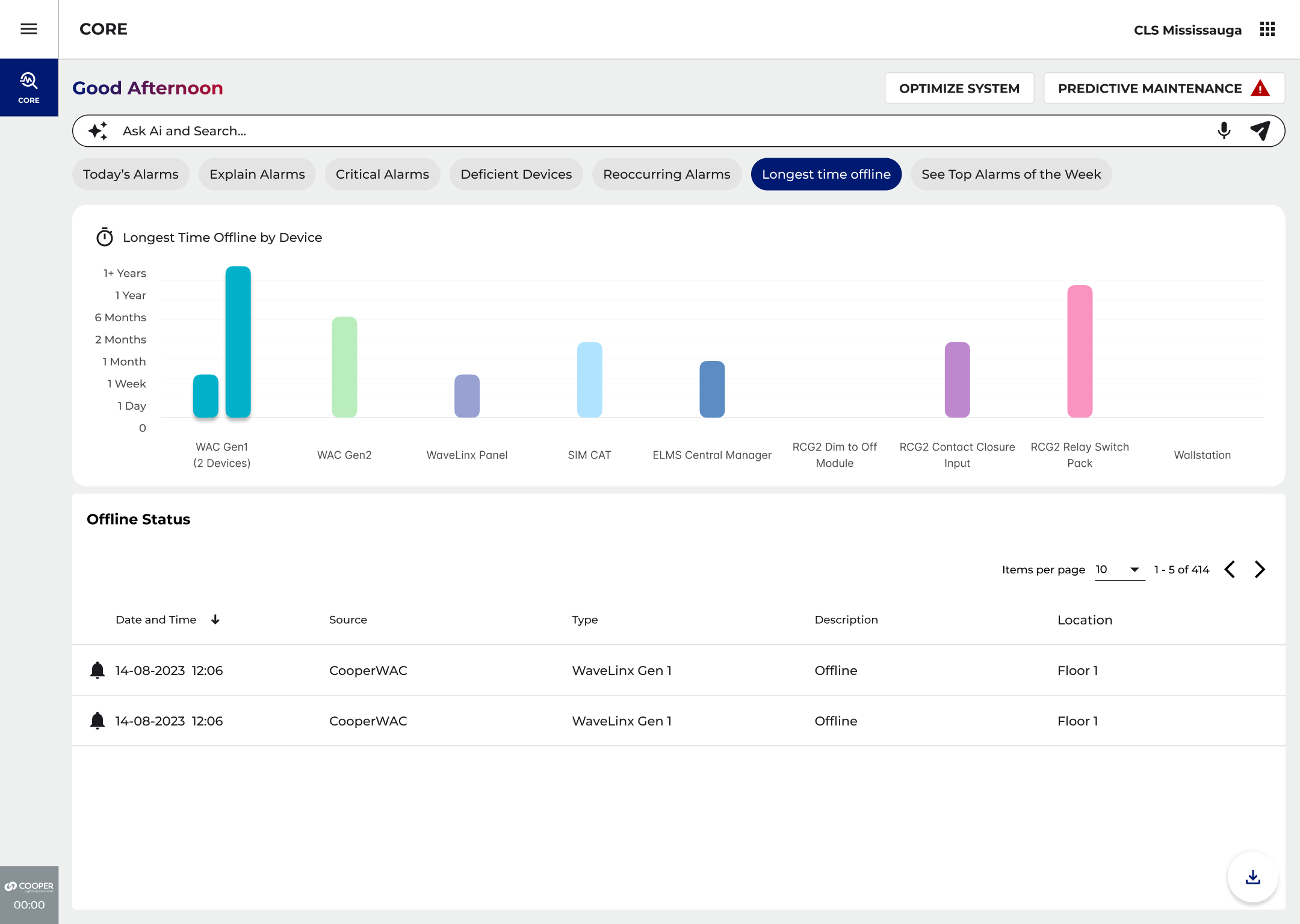
The Explain panel puts the cause in one plain sentence and the fix in a numbered list. The maintenance view sorts devices by how long they have been quiet and how much life they have left, so the worst ones float to the top.
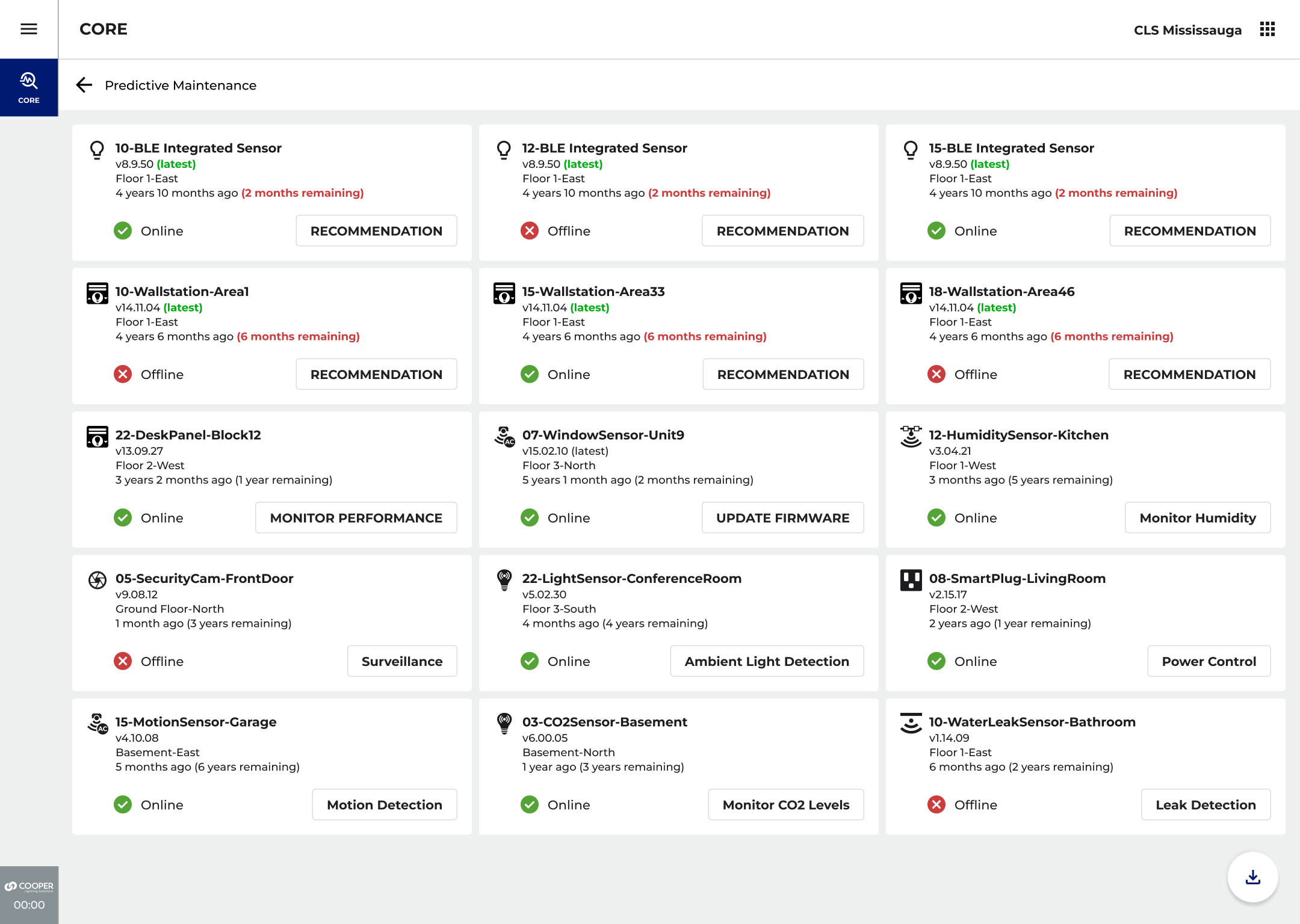
core · what needs attention soon
A card for each device showing its software version, how long it has been installed, how much life the AI thinks it has left, and a suggested fix
A chart ranking devices by how long they have been silent, longest first
A screen for picking one goal for the building, saving energy or keeping people comfortable, and letting the system tune itself to it
Left: which devices have been silent the longest · Right: pick a goal, let the system tune the building
The Same Help, Out in the Field

From a sentence to the exact light

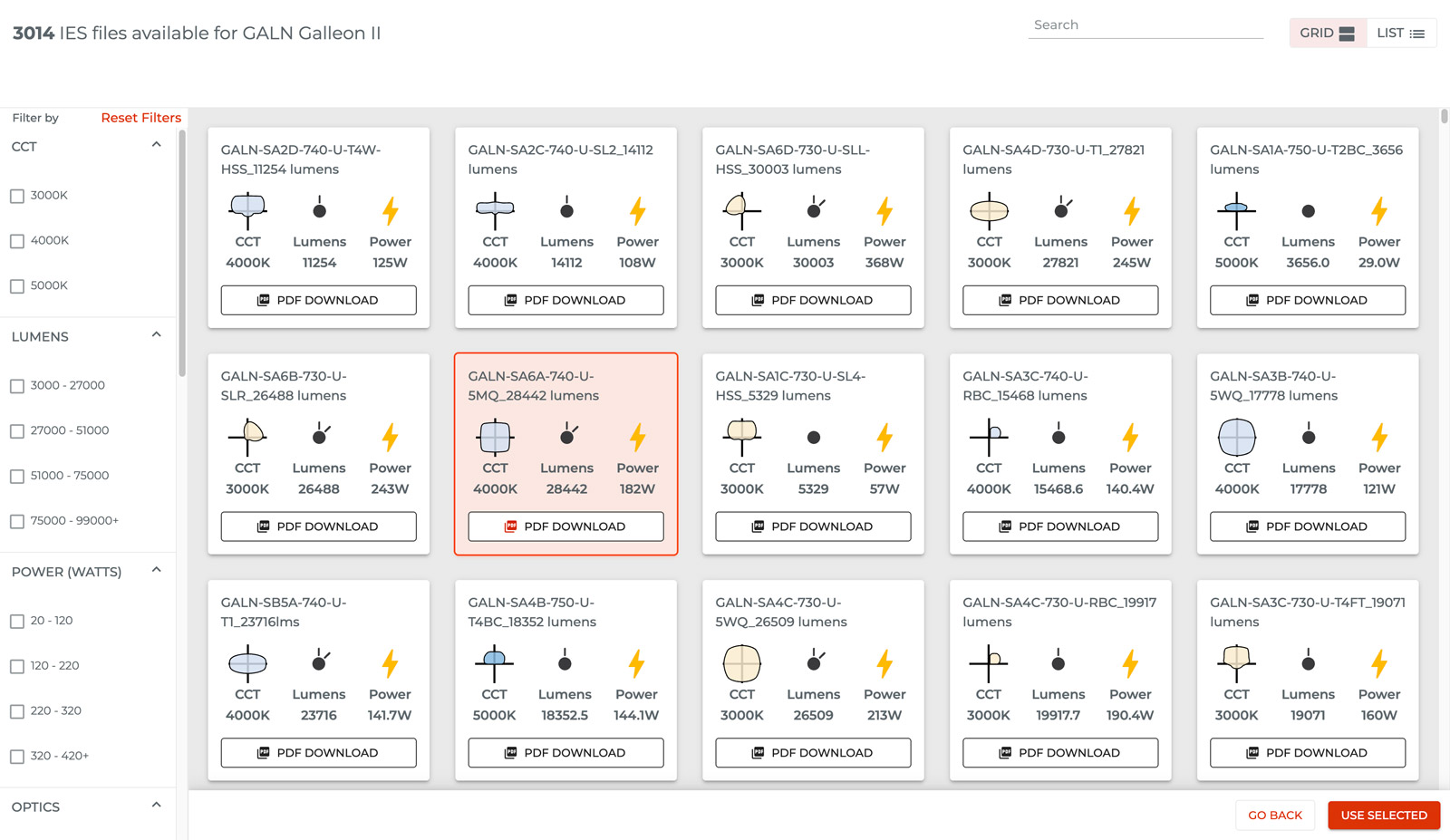
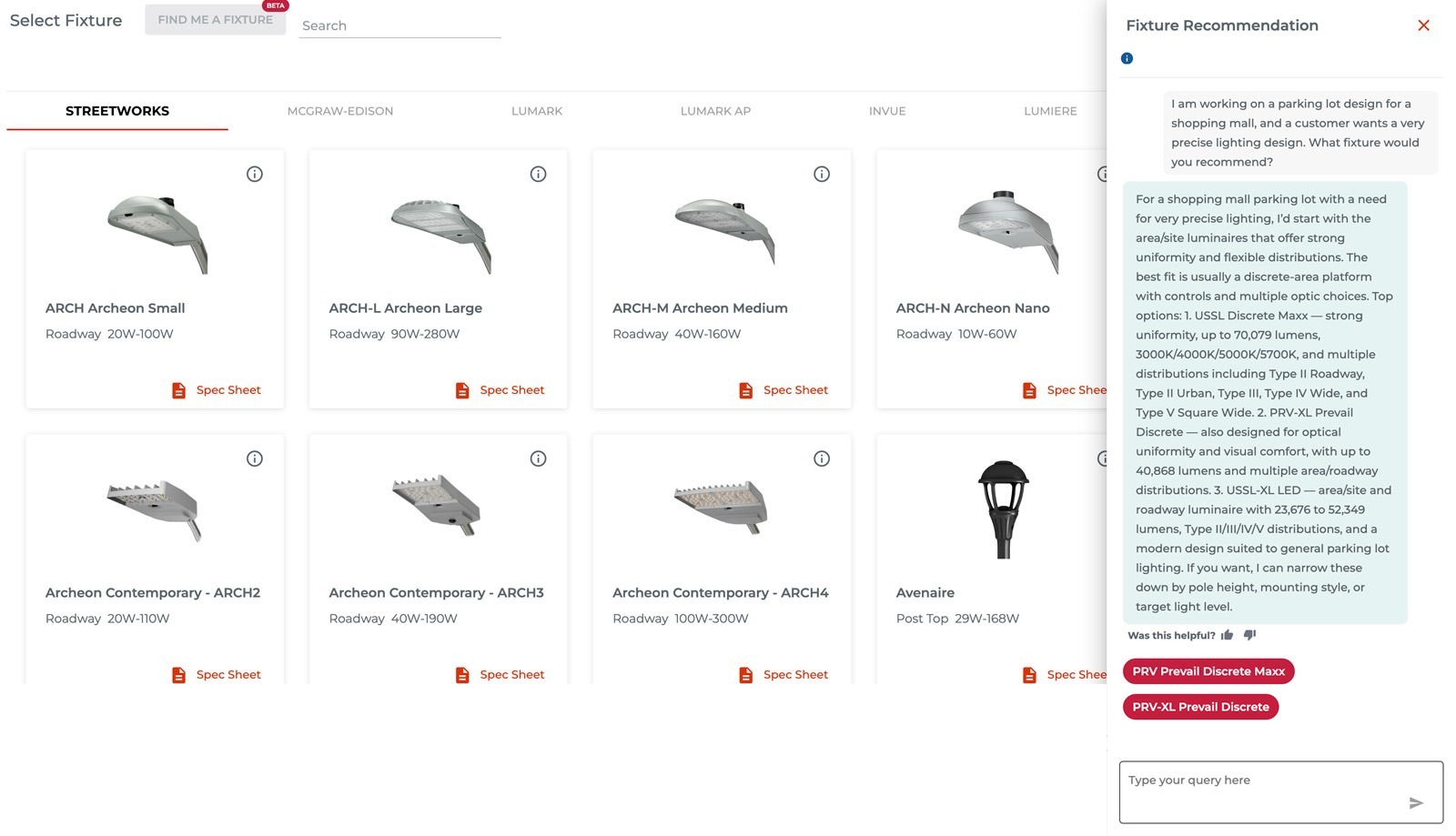
The same help reaches the people choosing and selling the lights. Describe what you need in a sentence and it comes back with specific products. From there you can search a library of 5,000 light files, and let it drop the lights onto a map of the real site for you.
core · pick a light · ai suggestion
A panel where you describe what you need in a sentence and the AI comes back with specific light fixtures to use
A searchable library of light files, filtered by color, brightness, power draw and beam shape
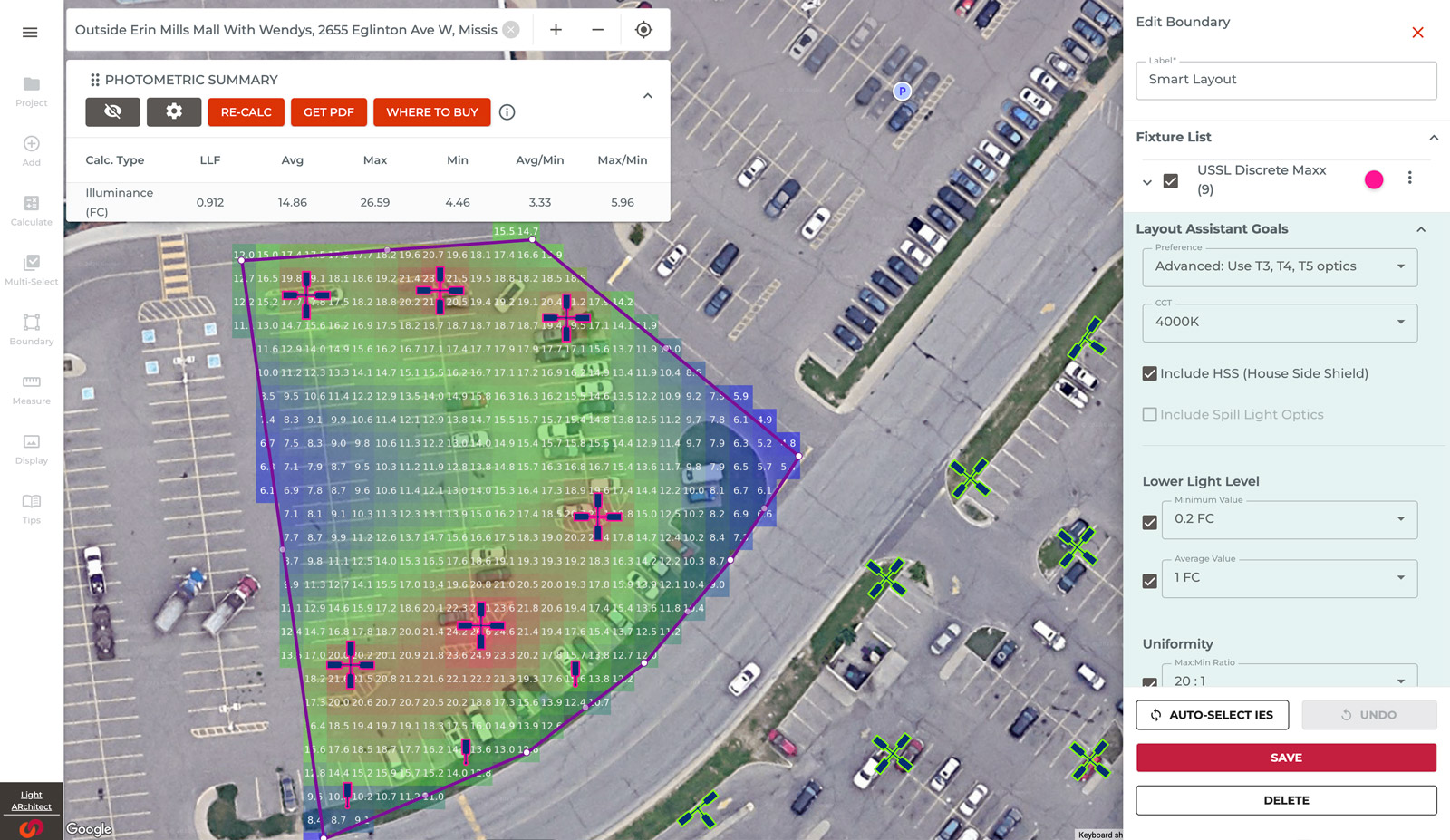
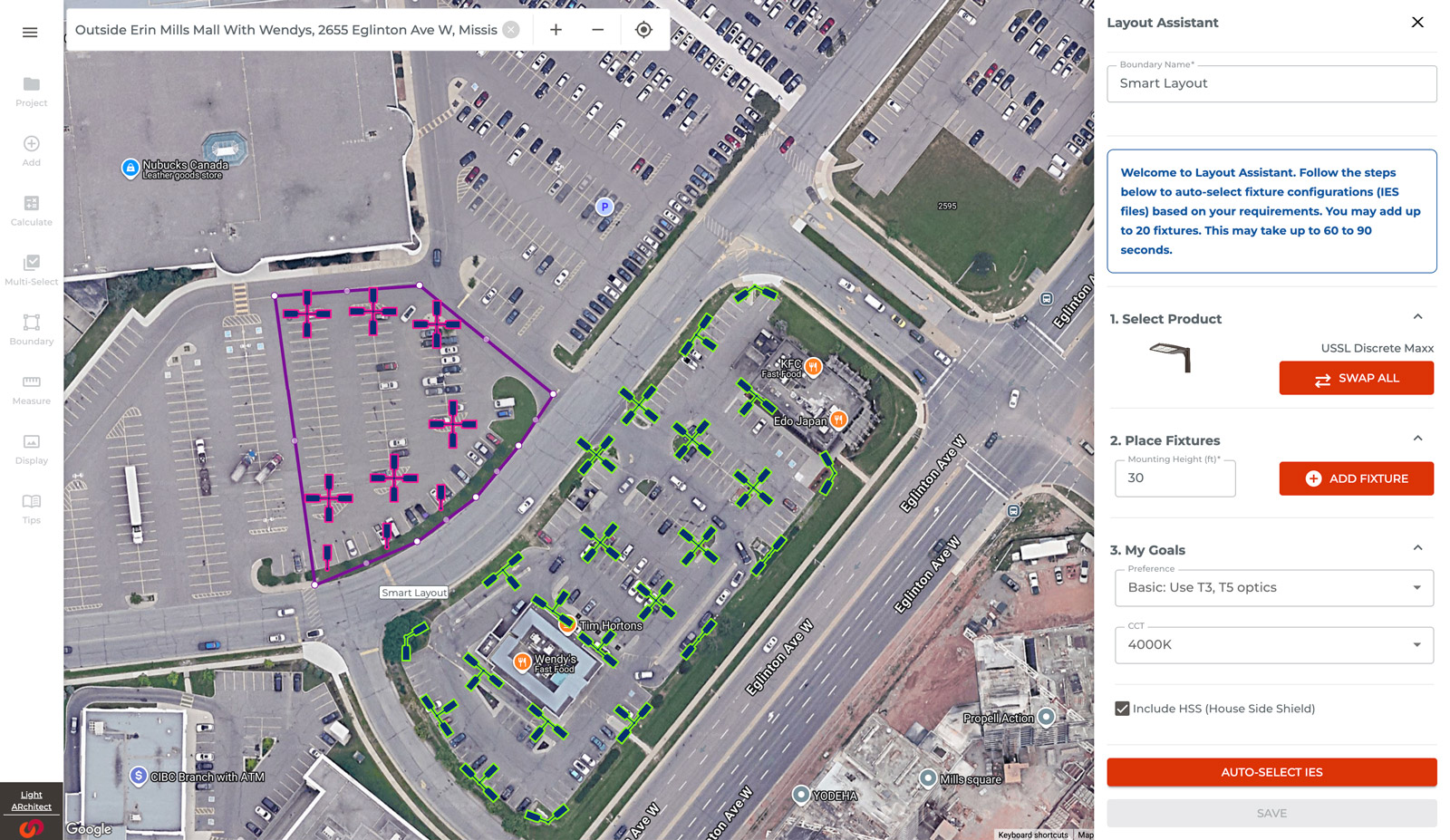
Drawing a line around an area and saying how bright and how even you want it. The software then picks the right lights for everything inside the line.
The layout helper dropping lights onto a map of the real site, spaced to hit the brightness you asked for

5,000 light files, filtered and exported in one click · the layout helper drops up to 20 lights into an area to hit the brightness you asked for, evenly.

Where It Landed

Built for the person who gets the call

Pointing the AI at something people already hated, that wall of error codes, gave it an obvious job from day one. What comes next is making it show its working: why it thinks a light is about to fail, not just that it does, and what it has learned since it started tuning the building.
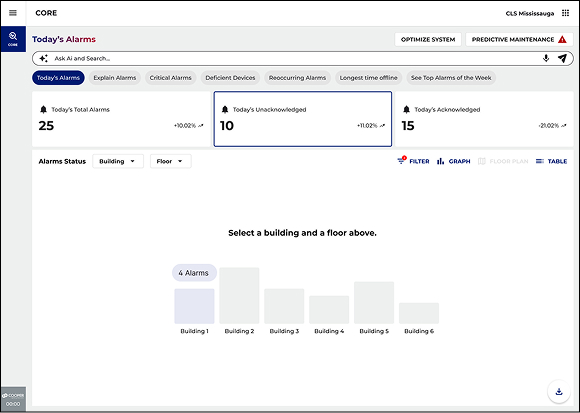

The main screen, pulling the search bar, the day's problems and every device into one view
A technician in an electrical room checking a handheld, which is where this actually gets used
The goal picker that tunes the whole building toward the one thing you choose
By the Numbers

What it added up to

0
Big ideas: ask it, explain it, warn you early
0+
Error codes turned into plain-English fixes
0
Light files you can actually search
0
Lights the software places for you, per area
Work that shipped · cooper lighting · 2026.

The goal was never to bolt AI onto a dashboard. It was to make a building with 400 devices answer a question, and tell you what to do next, the way the best technician on the team would.

Version Quick tour Deep dive