Cooper Lighting · Signify · Connected buildings

The building that explains itself

Every light in the ceiling is secretly also a sensor. I designed the app that turns all those signals into one live map anyone can read at a glance: which rooms are busy, where there's a free desk, where energy's being wasted. You open it and the answer is already there, without a spreadsheet and without a training session.

Read the full case study Meet the people
floor 5 · live occupancy
A live map of one floor: a colour heat map showing how busy it is, how much room is left, and the trend, all on one screen
One floor, right now: how busy it is, how much room is left, and which way it's headed, all on one screen
What it is

A building that keeps an eye on itself

Every light in the ceiling is also a sensor. Together they notice when a room fills up, when a floor goes quiet, and how much energy a space is burning through. The catch: all of that used to land in a monthly report. True, but useless, like getting last week's weather forecast.

I designed the whole thing: the installer's first setup, the live floor map, and the big-picture view a manager scans across every building. My job was to take that firehose of signals and turn it into one window that four very different people could each just read.

Role
Lead Product Designer · end-to-end UX
Client
Cooper LightingSignify
The people
Installer · Facilities managerAnalyst · Employee
Timeline
2020–2021Designed in Adobe XD
Domain
Connected lighting · how spaces get used
Platform
Web · iOS · Android
Why it mattered

It only counts if it gets installed

There's no smart building until the hardware is actually on the ceiling. Which means the first design problem had nothing to do with charts or dashboards. It was making the physical system genuinely easy to install.

01
Easy in the ceiling
The wiring could go in all sorts of layouts. My job was to make that flexibility feel simple, so an electrician could bring a whole floor online fast, and get it right the first time.
02
Installed means data
Easy installs are what get whole buildings switched on. Without the install there's no data at all, and everything clever further down the line depends on getting this first step right.
03
Then: three very different readers
Only once the data's flowing does the fun part start: one design that has to work for an electrician, a facilities manager, and someone just trying to find a free desk.
The people

The same signal, shaped to each person

It starts with the installer who brings a floor to life. From there the exact same signal becomes the manager's floor-and-room view, the analyst's building-by-building comparison, and a simple map of what's free for anyone just hunting a seat.
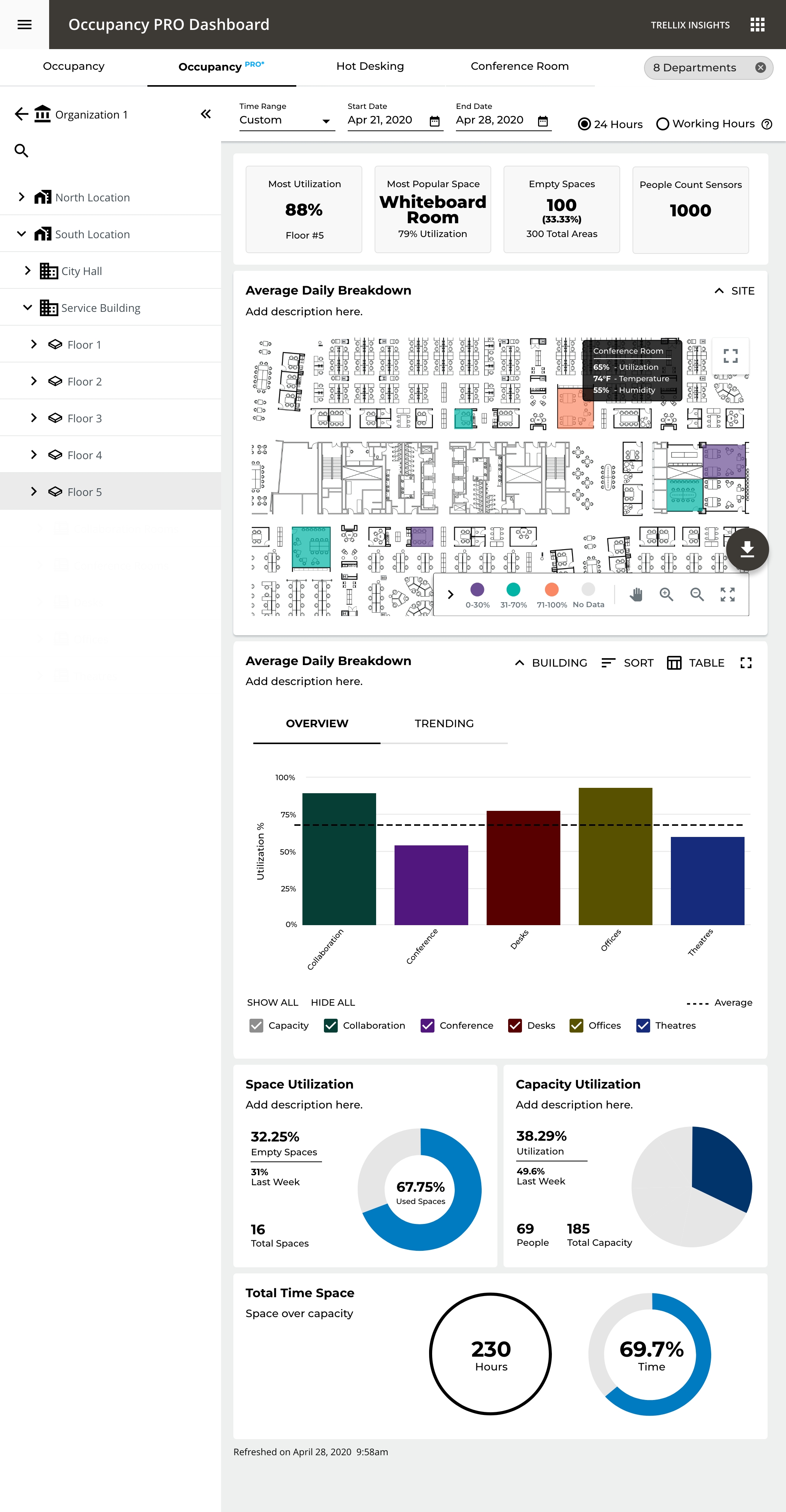
Analyst view comparing occupancy, energy and alerts across every building at once
The analyst: every building, side by side
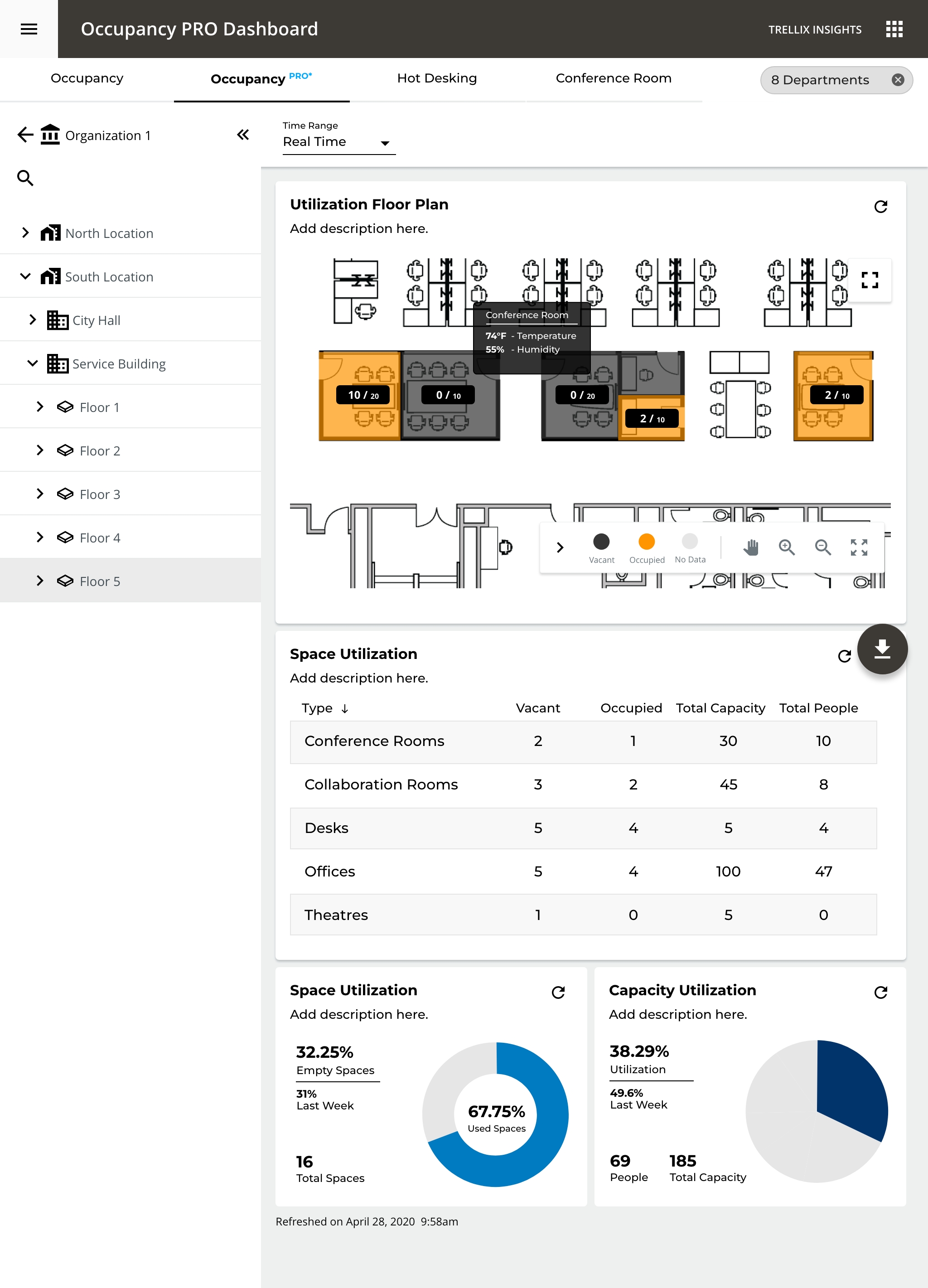
Facilities manager floor view: a room dashboard laid over a spatial heat map
The manager: one floor, one room
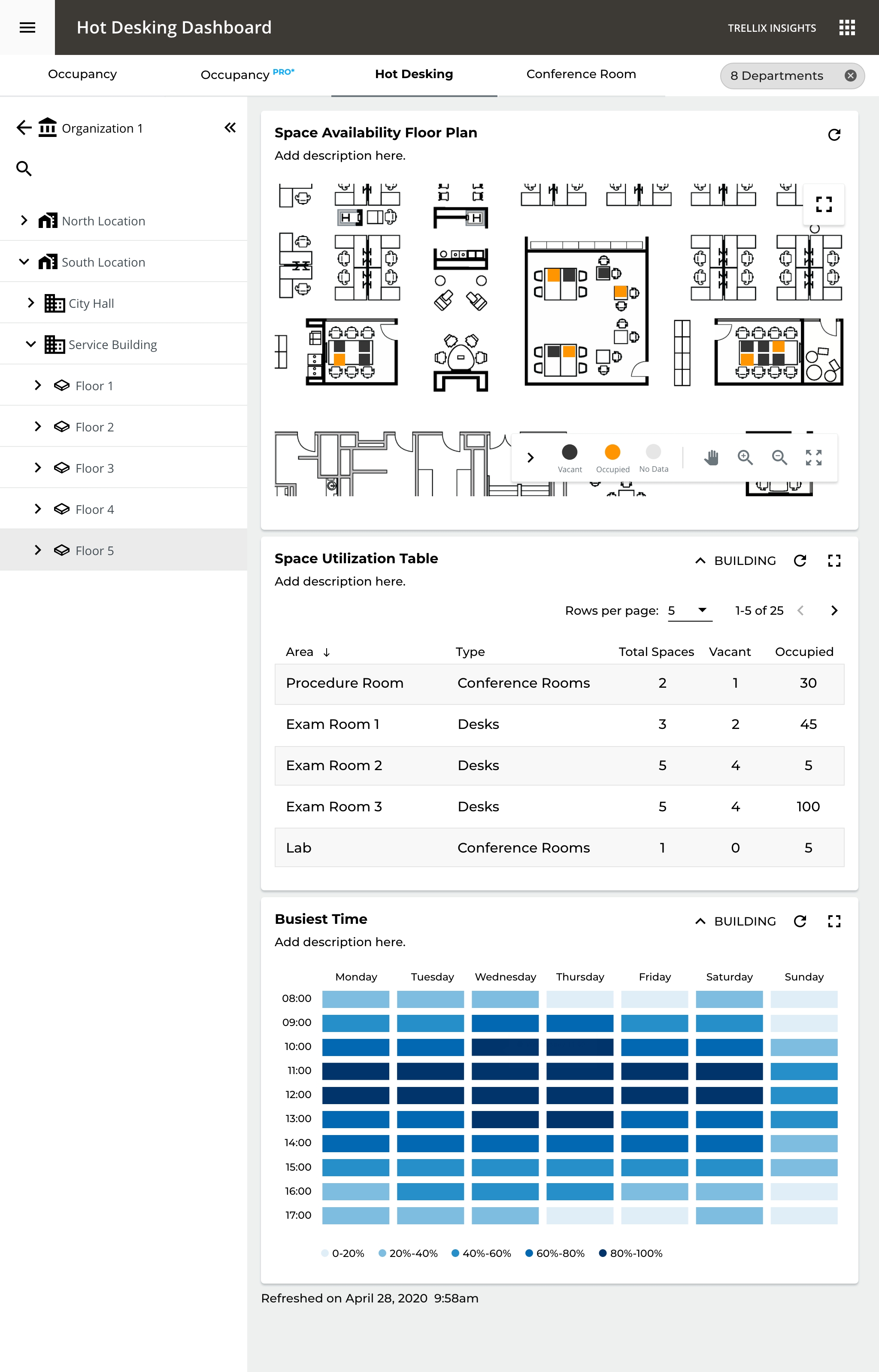
Desk-availability view: free and taken seats shown on the floor plan in real time
The employee: where's a free desk?
The installer never sees a dashboard. Their work happens up a ladder, which is where the whole picture starts.
The whole journey

From install to insight

The work gets handed from one person to a completely different one, like a relay race. I mapped the whole thing start to finish, and that's how each step earned its design.

01Install
Who
Electrician
What happens
Put the light fixtures and sensors up, and wire them together, in whatever layout the building needs.
The design job
Make a flexible physical system simple to install.
02Set up
Who
Setup tech
What happens
Give every area a name: this floor, that room, this department.
The design job
Turn a list of devices into a map of real places.
03Go live
Who
The system
What happens
The sensors start reporting: who's where, and how much energy each space is using.
The design job
Make that first day of data feel trustworthy.
04Day to day
Who
Manager · employee
What happens
Read the floor at a glance; find a free desk; see which rooms actually get used.
The design job
Answer "how is this space used?" in one look.
05Improve
Who
Analyst
What happens
Compare buildings, resize spaces that are too big or too small, and cut energy where rooms sit empty.
The design job
Roll everything up without losing the single room.
Behind the glass

One question, top to bottom

Say a manager asks the simplest question in the world: why is this floor so empty? Here's every layer working to answer it, from the screen in their hand all the way down to a sensor in the ceiling.

01Open the floor
02Spot the quiet room
03Tap it
04Read the truth
Person does
Opens the floor they manage
Scans for the space that looks cold
Taps that room
Sees who's there, how full, and the trend
They see
A live heat map, not a spreadsheet
Colour from empty to full
The room lifts out of the plan
Now vs. capacity, plus the trend line
System, unseen
Streams motion from every sensor
Smooths brief gaps so blips don't count
Works out how full that space is
Rolls the room up to floor and building
What holds it up
Names given to places at setup
Sensor timing set for each space
The same map of places, zoomed in
One view: everyone sees the same truth
The approach

From a map of devices to a map of places

Under the hood, the system knew every single light fixture. But nobody runs a building thinking about light fixtures. They think in floors, rooms, and questions about them. So I built the whole app around places instead: each screen shows just enough, and the chart changes to match the question you're asking.

01
One level at a time
Organization → building → floor → room. Each step reveals a little more, so you're never staring at everything at once.
02
The chart fits the question
Bars to compare buildings, a heat map to stand in the space, a line to read one room over time.
03
The room, in context
Hover a space and its temperature and humidity surface right on the floor plan, so you get the answer without ever leaving the map.
04
Answers up front
Which rooms are empty, which space is busiest: those sit on cards at the top, instead of hiding behind a string of clicks.
The floor, live

A spreadsheet becomes a living map

Zoom into a floor and the bar charts give way to a heat map, because down here, getting a feel for the space beats comparing numbers. Tap any room to see who's in it right now, how full it is, and where it's headed.
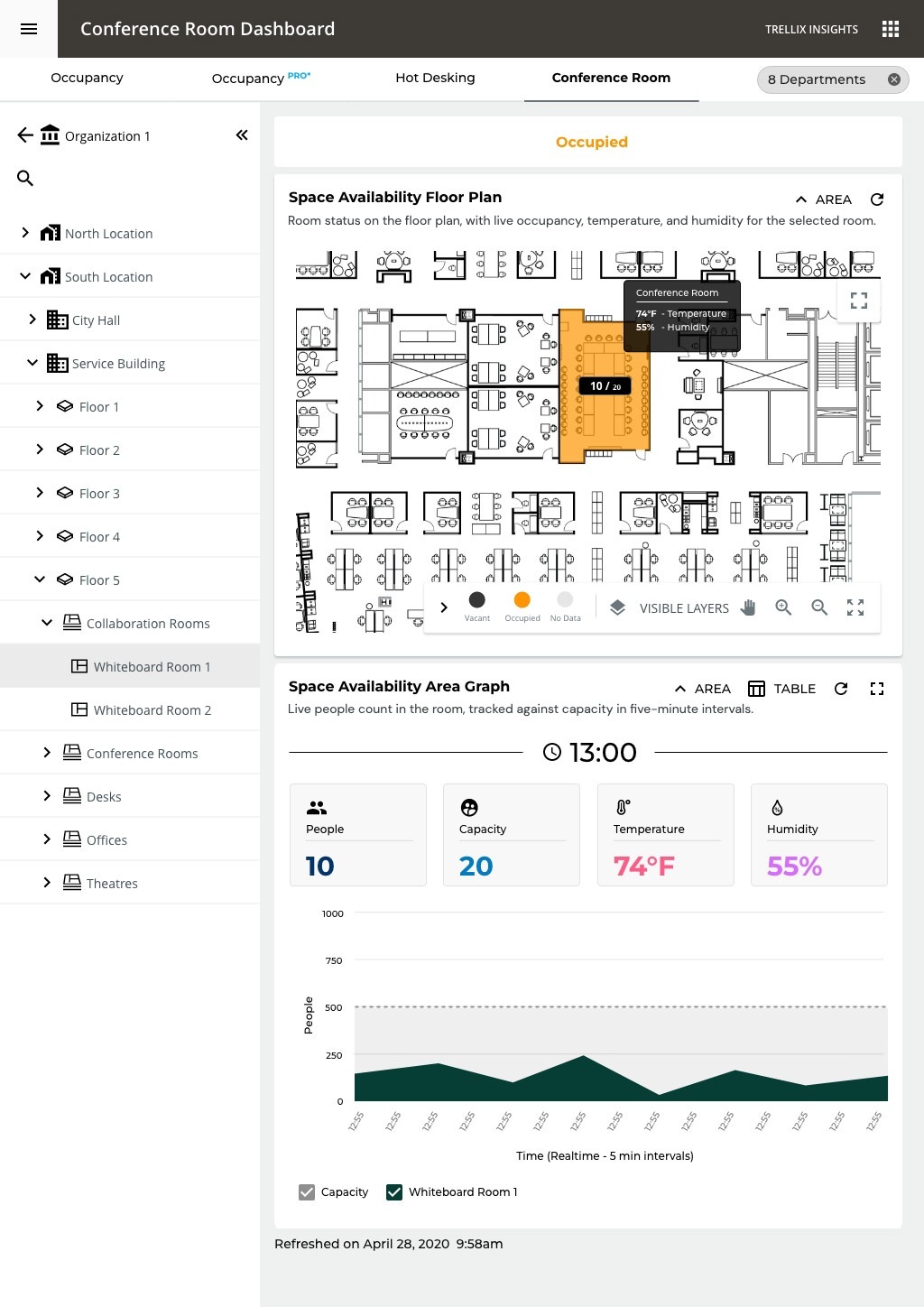
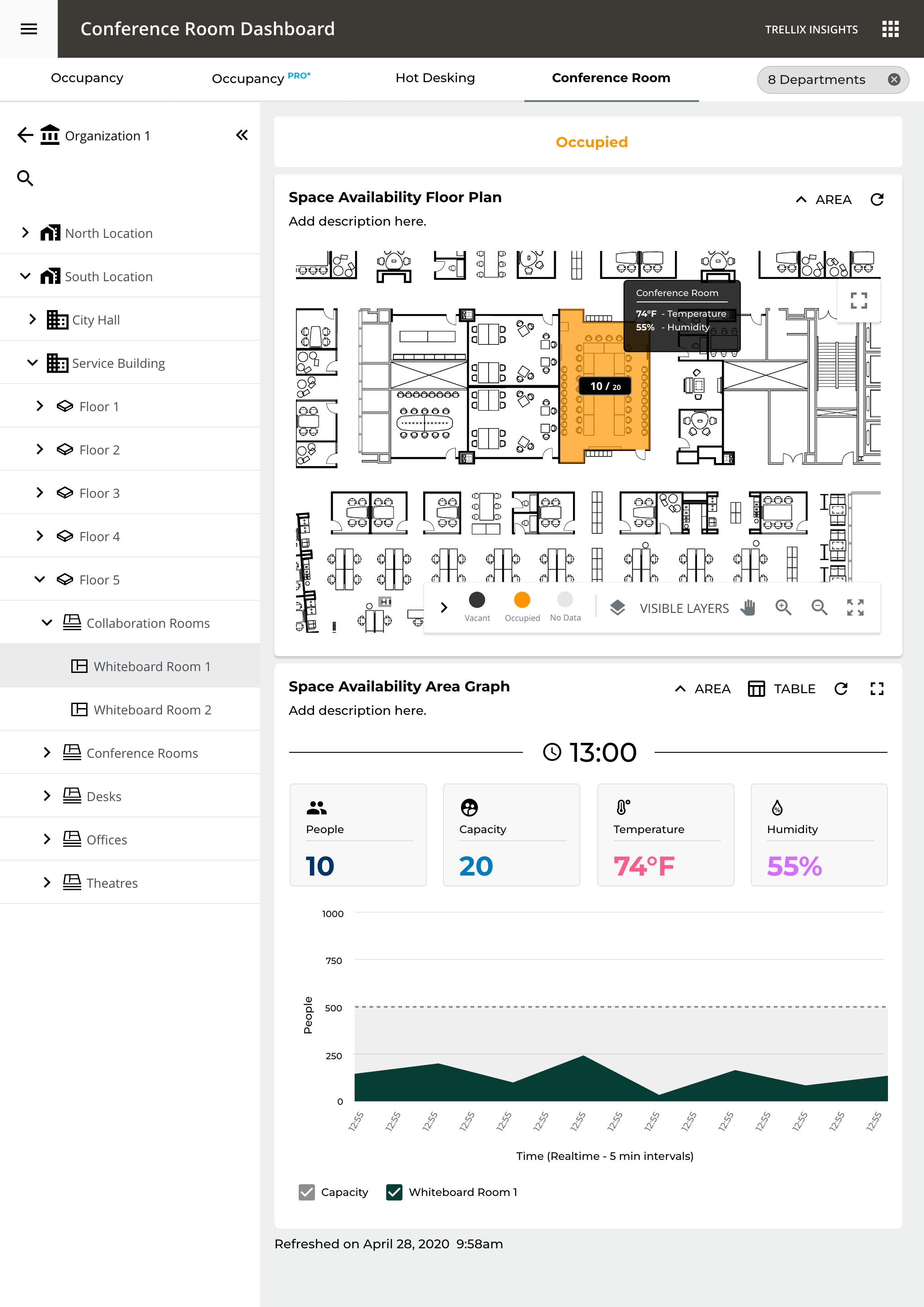
tower A · floor 5 · live
A floor plan used as a live map: the occupied room is highlighted (10 of 20 seats), with live temperature, humidity, and a people-versus-capacity graph
Colour carries the whole story: from a room that's empty to one that's at capacity
Outcome

Built for how a floor actually works

From the employee grabbing a free seat, to the manager ranking rooms by how much they get used, to the analyst comparing whole buildings: it's all the same map of places, just seen from a different height.

Hot Desking dashboard, per-desk vacancy on the floor plan with a busiest-time heat map for planning arrivals
Conference Room dashboard, live room status with people, capacity, temperature and humidity in spatial context
Portfolio dashboard rolling occupancy, energy, and capacity across multiple buildings into one view
At a glance

The shape of it

I don't have invented success metrics for this one. What follows is the shape of how it's built to be read.

0
Levels deep, from the whole organization down to a single room
0
Ways to read a space, each matched to the question being asked
0
Very different readers, sharing one map of places
0
Ways to see any space, right now and over time
INSTALL → INSIGHT · ONE MAP OF PLACES · WEB · iOS · ANDROID
View Quick tour Deep dive