Smart home lighting

Hundreds of lights, one simple app

This is the lighting tech built for office towers, rebuilt for a house. Underneath, hundreds of bulbs are talking to each other and adjusting all day. On screen, it is one tap. I designed the app that keeps it that way.

Read the full case study See how the lights find each other
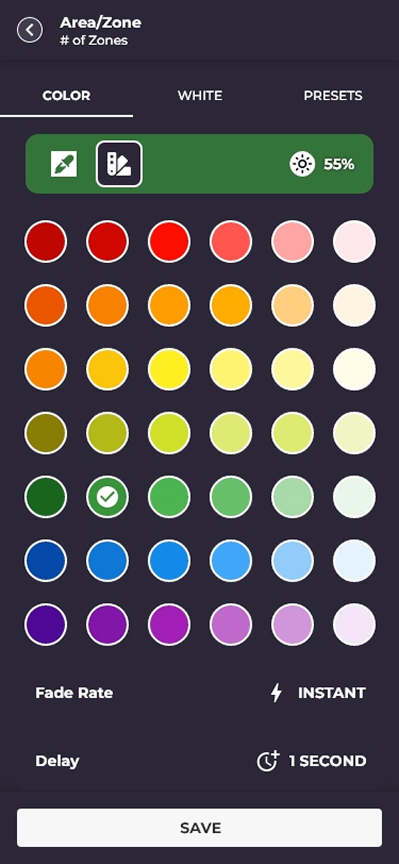
The colour picker, a full colour wheel for one room
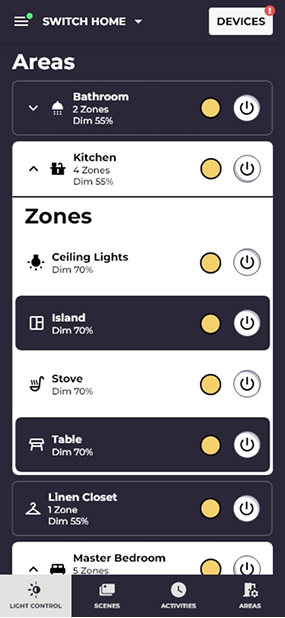
The everyday screen: on, off and brightness, all in one place
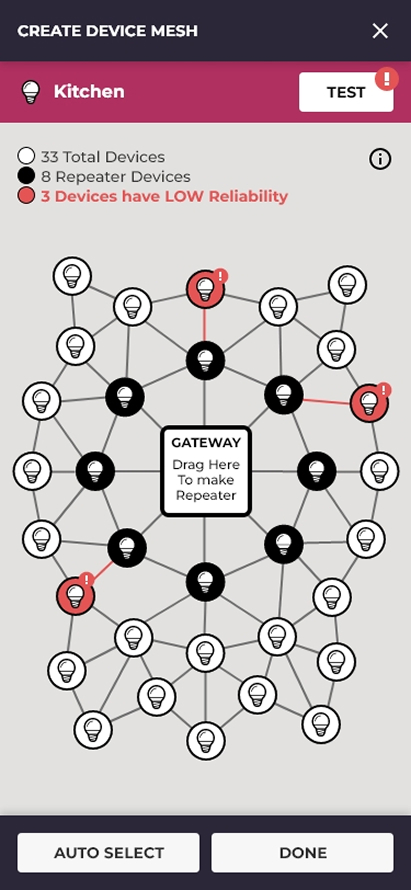
A map of every light in the home, showing which ones pass the signal along
Everyday control, colour, and a map of every light, one app, three levels of depth
The idea

Office building brains, home app simple

The company already made lighting for offices and hospitals: bulbs that pass signals to one another, light that shifts warm and cool as the day goes on, one place to run a whole building of them. The idea was to put all of that in a house, and make it feel like a light switch.

The catch: at work, people put up with a clunky tool because it is their job. At home, nobody does. Fumble once and the app gets buried on the last screen, and the lights go back to being ordinary lights. So every screen had to hide the complicated part without throwing it away.

Role
Product Designer
Scope
Research and structureScreens, system, prototype
Platform
iPhone and Android
Who uses it
People who live there · TinkerersBuilding managers
Field
Smart home lighting
Size
32 to 247 lights
Challenge

Powerful, without the headache

Three problems shaped every screen. Each one had to be solved outright, not split the difference on.

01
People quit when it is fiddly
The things you do every day, on, off, brighter, warmer, have to be one tap away. Everything else waits quietly out of sight until you go looking for it.
02
Nobody wants a network diagram
You should not have to know how the lights talk to each other. You just need to trust that they do, whether there are 30 of them or 300.
03
Setup is the worst part
So you set the lights up before they ever reach the ceiling. Scan one while it is still in the box, tell the app which room it belongs to, done.
The screen you actually use

Everything you use, one tap away

Any colour, soft white, warm through to cool, or a saved look like Movie Night. One picker that changes shape to match however you happen to be thinking about light right now, with no settings maze to dig through.
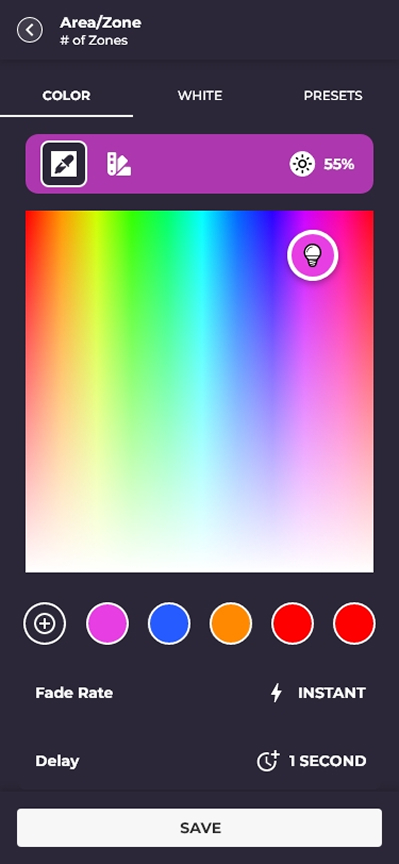
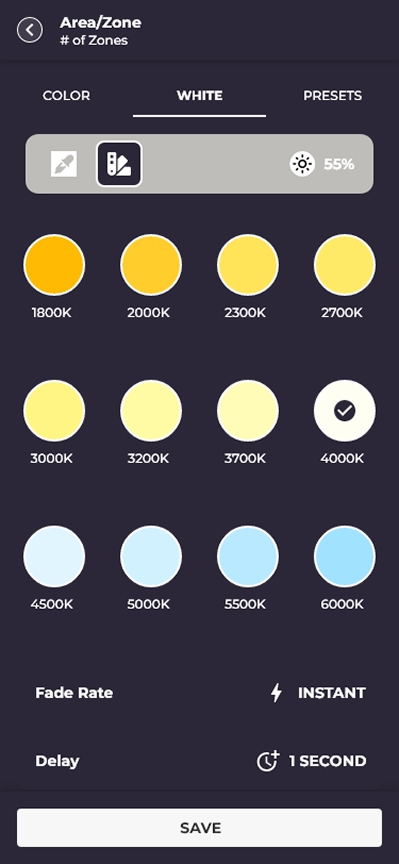
The colour picker, a full colour wheel for one room
Any colour
The white light picker, sliding from warm to cool
Warm to cool white
Saved lighting looks you can tap, like Movie Night
Saved looks
Approach

Hide the wiring, keep the power

Everything a tinkerer could want is still in there. Someone who just wants the lights on never has to meet it. The app earns trust by staying calm, and goes deep only when you ask it to.

01
One tap for the everyday stuff
The things you touch every day sit right on the first screen. The settings live behind a panel that stays folded shut until you open it.
02
The network, drawn as a map
Instead of a wiring diagram you get a friendly map of your home, and the app sorts the lights into groups by itself. A 32 light condo and a 247 light house feel exactly the same to use.
03
Set it up before you hang it
Tap your phone to a light, or scan the code on it, while it is still in the box. Give it a room and a name. Not one fixture has to be on the ceiling yet.
04
Light that follows the day
Brighter and cooler in the morning, warmer and softer at night, all on its own. Take the wheel whenever you want it your way.
The hardest screen to design

How do you set up a network for someone who never wants to know it exists?

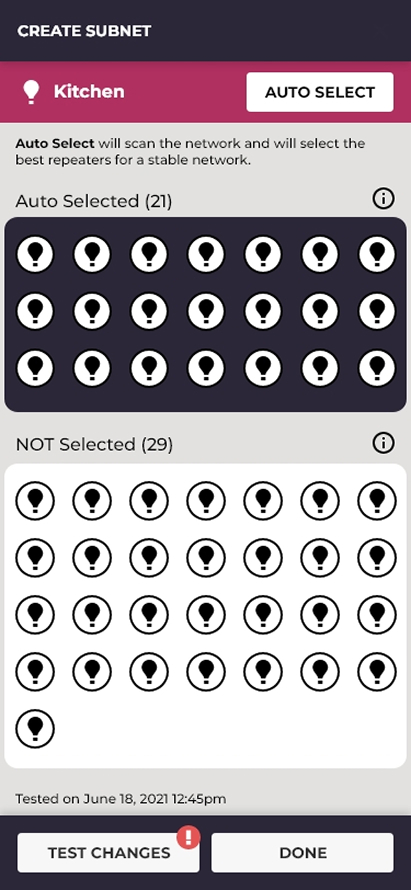
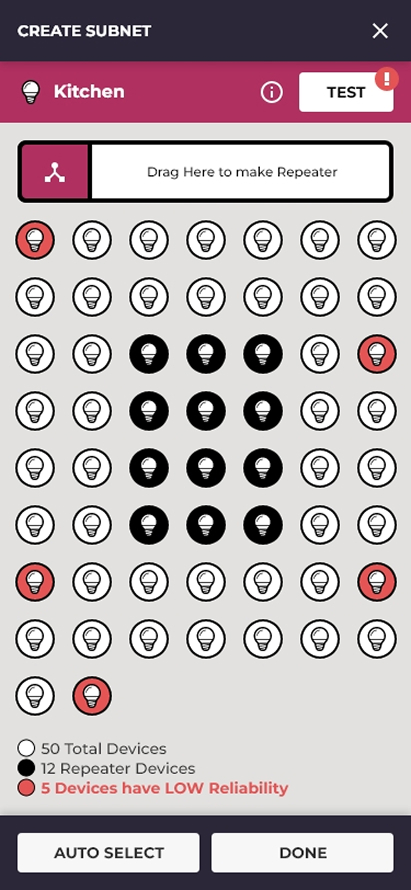
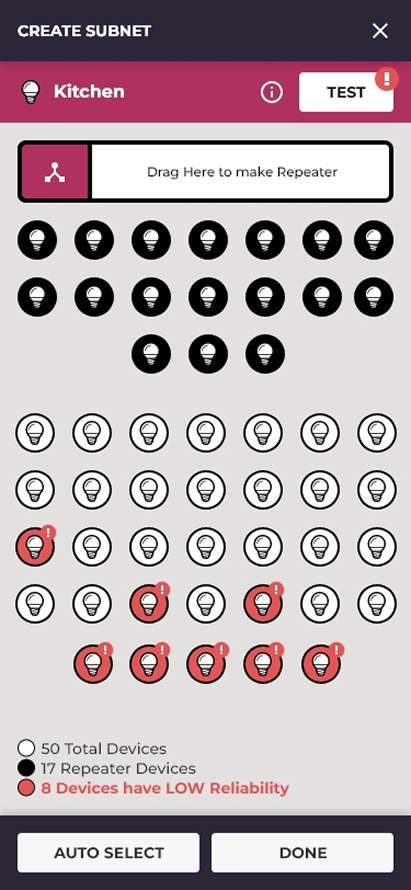
Nobody has to understand the technology if they can read a picture of it. Every dot is a light. A filled dot is doing extra work, passing the signal along to the ones further away, which the screen calls a repeater. A coral dot marked with an exclamation mark is struggling. We put forward four versions, click through them. The first one is rebuilt and working right there in the phone.
Lights bunched into groups by how close together they are Groups a person has built themselves The app choosing which lights pass the signal along
Idea 1, rebuilt live: drag a light onto the gateway to give it the relay job
Idea 1 · bulb map Dropped
Drag a light to make it a relay

A real map of every light in the house. Drag any one of them onto the gateway box and it starts relaying the signal to the lights around it. A coral dot marked with an exclamation mark is one that is struggling. Powerful, but it asked a homeowner to think like a network engineer. This phone is a working rebuild: drag a flagged light onto the gateway, then press TEST.

How much you have to work out
A lot. You pick every relay yourself.
Same idea, a lot more lights

The same map works for a 32 light condo and a 247 light house. The app does the sorting: which lights belong together, and which ones relay the signal onward. In the big example: 247 lights, 66 of them relaying, sorted into 22 groups, all worked out by the app.
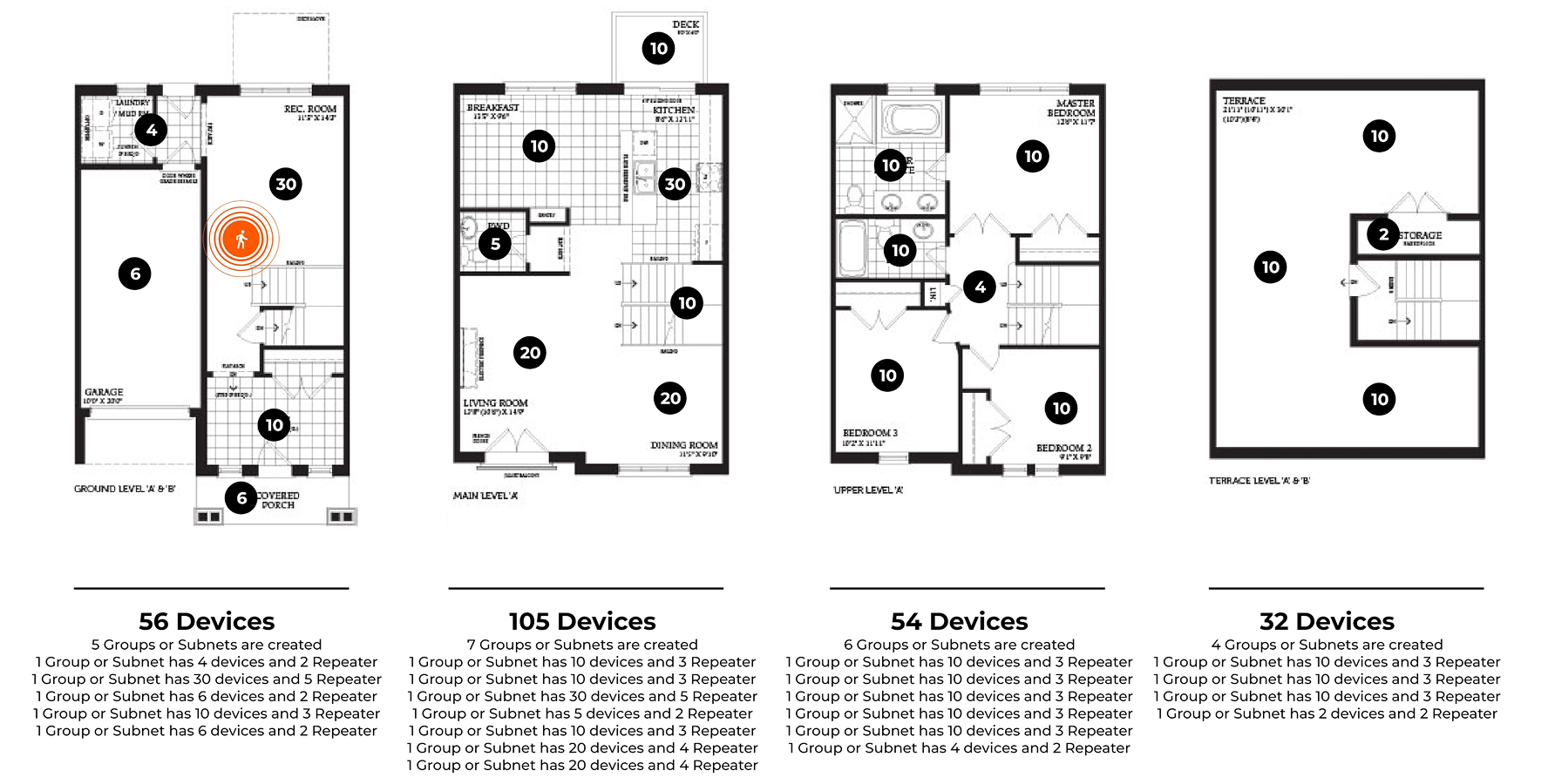
Floor plans of a whole home, every light placed and sorted into groups
The app sorting the lights into groups, drawn over real floor plans
Outcome

A network you never have to think about

One map that works for a condo or a big house. Light that shifts with the day on its own. And a building manager can run a whole set of homes from one place. None of it asks you to know how the lights talk to each other.
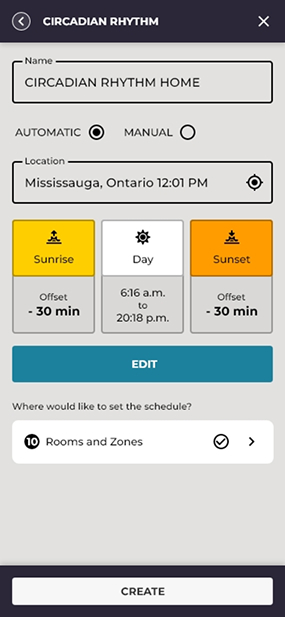
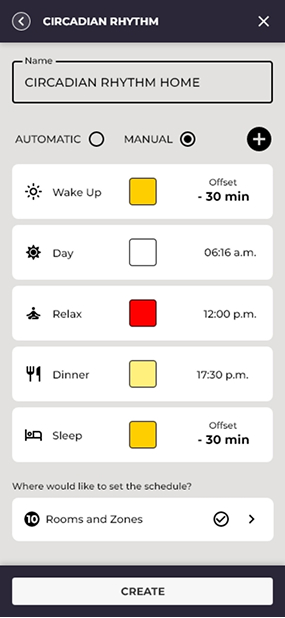
The app sorting the lights into groups by itself
Lights sorted into groups, by the app
Light shifting through the day on its own
Follows the day on its own
The parts of the day: morning, afternoon, evening and night
Morning, afternoon, evening, night
By the Numbers

How big this gets

0
Lights in the biggest home, all on one map
0-tap
To reach anything you use every day
0
Kinds of people it had to suit: you, the tinkerer, the manager
0h
Hours a day the light shifts by itself
A concept I took on myself. these numbers describe the design, not measured results.

Nobody needs to understand how the lights talk to each other. They just need to trust that they do. Making the complicated part disappear is the whole job.

Version Quick tour Deep dive